
We are in 2026 right now and have seen a lot of transformations in managing business operations. Technology here is considered the backbone for organizations. From communication and collaboration to cybersecurity and cloud computing, enterprises are continuously dependent heavily on IT infrastructure to remain competitive in this market.
Additionally, technology will not protect against all problems, but it can help to encounter issues such as software errors, login failures, network outages, hardware malfunctions, and security concerns. This is where IT support plays an important role.
According to industry standards, the average employee loses several hours of productivity each month due to unresolved IT-related issues. As businesses grow and technology evolves, organizations seek various ways to manage and resolve technical requests. This is where an IT ticketing system becomes essential.
Fill up the form today to know more about HR Automation, IT, and Finance Tickets Automation, our team will connect with you shortly!
Let’s move to this guide and explore what exactly IT support is, why it matters, and how IT ticketing systems work, their benefits and key features, and how IT ticketing solutions are transforming the modern IT service management.
Explore Agentic Automation for Finance and Accounting Teams - Full Guide
What Is IT Support?
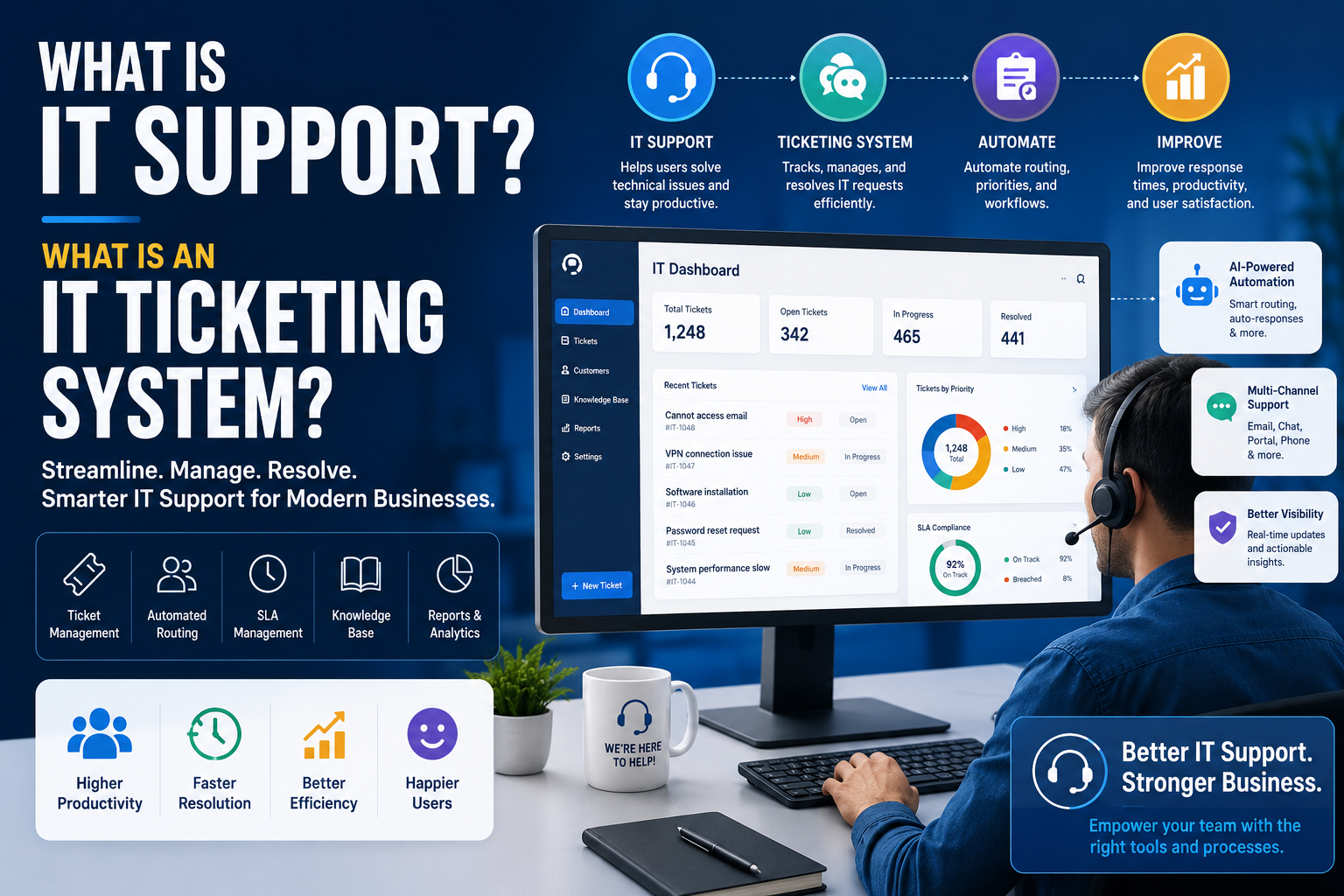
IT support directly relates to the services and processes used to help employees, customers, and stakeholders resolve technology-related issues.
The major aim of IT support is to ensure that computer systems, software applications, networks, and digital tools function efficiently with minimal downtime.
The IT support team supports employees or users with:
- Password resets
- Software installation
- Hardware troubleshooting
- Email issues
- Network connectivity problems
- Cloud platform support
- Security concerns
- System updates
- Device configuration
- Technical guidance
Without IT support, organizations face reduced productivity, increased downtime, frustrated employees, and potential security risks.
What is an IT Ticketing System?
As hard as developers and network administrators work to create perfect networks, software, and websites, it is not always that easy. Team members frequently encounter software or hardware issues, and it’s important to have a streamlined process for addressing IT issues to keep enterprises moving forward.
IT support tickets are straightforward to simplify internal IT issues. You can utilize an internal IT ticketing system to raise issues to your IT team, who can review and address service requests.
How Does the IT Ticketing System Work?
IT tickets follow a proper process during their lifecycle, starting with the creation of the ticket. When a team member experiences an IT issue, they will create a ticket that will be directly sent to the IT team. When a ticket is created, it will be categorized based on the ticket type and priority.
Once the ticket has been created and categorized, it will be directly sent to the appropriate IT team member for fulfillment. At that stage, your IT team will take the necessary steps to resolve the issue before closing the ticket.
Automation is key in streamlining the IT operations by managing ticket management and making prioritization easier. The Automated workflows can automatically categorize and prioritize tickets, and make the ticket submission and assignment more efficient and effective.
Explore More About: Voiceoc AI Finance Ticketing Automation 2026
Why Do Enterprises Need an IT Ticketing System?
Utilizing an IT ticketing system works on managing the business processes. Without an IT ticketing system, teams have to take the time to contact the IT team with specific issues that they are actually facing, which leads to longer response times.
Your IT team must also spend more time manually categorizing and prioritizing the tickets since the IT processes are not automated or streamlined.
A structured IT support system assists in improving the response times, reducing downtime, and creating a better user experience. IT tickets are automatically categorized and prioritized by utilizing the automated workflows, so your IT team receives tickets faster. Consistent incident management works on creating a better user experience and reduces downtime, minimizing losses that impact your bottom line.
Every enterprise should have an IT service desk with a streamlined ticketing system to save time and money.
Best Practices for Implementing an IT Ticketing System
Implementing an IT ticketing system is more difficult than deploying software. To achieve maximum efficiency and improve support operations, enterprises must follow proven best practices that work on streamlining the workflows, enhancing user experience, and ensuring long-term success.
- Define Clear Ticket Workflows
Before launching a ticketing system, it is important to establish standardized workflows for how tickets will actually be created, assigned, escalated, resolved, and closed. Defining the IT processes clearly reduces confusion, improves accountability, and ensures consistent service delivery across the IT department.
- Create Meaningful Ticket Categories
Organize support requests into categories such as hardware issues, software problems, network connectivity, access management, cybersecurity incidents, and service requests. Proper categorization helps IT teams identify trends, route tickets accurately, and generate valuable reports.
- Set Priority Levels and SLAs
Not all IT issues have the same level of urgency. A server outage affecting an entire organization requires immediate attention, while a software installation request may be less critical. Establish priority levels and Service Level Agreements (SLAs) to ensure urgent issues are resolved quickly while maintaining service quality.
- Automate Ticket Routing
Modern ticketing systems can automatically assign tickets to the appropriate technician or department based on issue type, priority, or user location. Automated routing reduces manual effort, shortens response times, and improves resolution efficiency.
- Build a Comprehensive Knowledge Base
A self-service knowledge base empowers employees to find answers to common technical issues without contacting the help desk. Articles, FAQs, troubleshooting guides, and instructional videos can significantly reduce ticket volume while improving user satisfaction.
Monitor Key Performance Indicators (KPIs)
Track important metrics such as:
- Average Resolution Time
- First Response Time
- Ticket Backlog
- SLA Compliance Rate
- Customer Satisfaction Score (CSAT)
- First Contact Resolution Rate
Regularly reviewing these metrics helps identify bottlenecks and opportunities for improvement.
Encourage Multi-Channel Support
Allow users to submit requests through multiple channels, including email, chat, web portals, mobile apps, and AI assistants. Providing convenient communication options improves accessibility and enhances the support experience.
Leverage AI and Automation
Artificial intelligence can automate repetitive support tasks such as ticket categorization, routing, response generation, and status updates. This allows IT professionals to focus on complex issues that require human expertise.
Continuously Train Support Teams
Technology evolves rapidly, making ongoing training essential. Regular skill development ensures IT staff remain knowledgeable about new systems, security threats, and troubleshooting techniques.
Gather User Feedback
Collect feedback after ticket resolution to understand employee satisfaction levels and identify areas for service improvement. Continuous feedback helps organizations refine support processes and deliver better experiences.
By following these best practices, businesses can maximize the value of their IT ticketing system while improving operational efficiency, employee productivity, and overall service quality.
Future Trends in IT Support and Ticketing Systems
The IT support landscape is evolving rapidly as organizations adopt artificial intelligence, automation, and advanced analytics. Traditional help desks are transforming into intelligent service management platforms capable of resolving issues faster and more proactively than ever before.
1. AI-Powered Service Desks
Artificial intelligence is becoming a core component of modern IT support. AI-powered service desks can automatically categorize tickets, prioritize requests, recommend solutions, and route issues to the right teams without human intervention. This significantly reduces response times and operational costs.
2. Agentic AI for Autonomous Support
One of the most significant emerging trends is Agentic AI. Unlike traditional automation, AI agents can independently analyze problems, make decisions, initiate workflows, and complete tasks with minimal human oversight. These intelligent systems can manage entire support processes from ticket creation to resolution.
3. Conversational AI and Virtual Assistants
AI chatbots and virtual support agents are increasingly handling routine IT requests such as password resets, account unlocks, software access requests, and troubleshooting guidance. These tools provide instant assistance 24/7, improving employee satisfaction while reducing support workloads.
4. Predictive Issue Detection
Rather than waiting for users to report problems, advanced monitoring tools can identify potential issues before they cause disruptions. Predictive analytics uses historical data and machine learning to detect anomalies and alert IT teams about impending failures.
5. Self-Healing IT Systems
Future IT environments will increasingly include self-healing capabilities. These systems can automatically diagnose and resolve common technical problems without requiring human intervention, minimizing downtime and improving service reliability.
6. Hyper Automation in IT Operations
Hyper Automation combines AI, robotic process automation (RPA), machine learning, and workflow orchestration to automate complex business processes. IT departments can automate incident management, asset tracking, user provisioning, and compliance monitoring on a large scale.
7. Enhanced Cybersecurity Integration
As cyber threats become more sophisticated, IT ticketing systems will play a greater role in security operations. AI-driven platforms will automatically detect suspicious activities, create security incident tickets, prioritize threats, and initiate response workflows.
8. Unified Service Management
Organizations are moving toward Enterprise Service Management (ESM), where a single platform supports IT, HR, finance, facilities, and customer service requests. This unified approach improves efficiency, consistency, and visibility across departments.
9. Generative AI for Knowledge Management
Generative AI tools can create knowledge base articles, summarize incidents, generate troubleshooting guides, and assist support agents with real-time recommendations. This improves both technician productivity and user self-service capabilities.
9. Personalized Employee Support Experiences
Future ticketing systems will use AI to understand user preferences, historical interactions, and specific needs. This enables highly personalized support experiences that improve satisfaction and resolution rates.
10. Voice-Based IT Support
Voice AI is becoming an important part of support operations. Employees will increasingly interact with virtual assistants using natural language voice commands to report issues, check ticket status, and receive troubleshooting assistance.
The Rise of Proactive IT Support
The future of IT support is shifting from reactive problem-solving to proactive service delivery. Organizations will use AI, automation, and predictive analytics to identify and resolve issues before users are even aware of them.
Businesses that embrace these trends will be better positioned to reduce downtime, improve employee experiences, lower support costs, and build more resilient IT operations in the years ahead.
How Voiceoc Enhances IT Support and Ticket Management?
As businesses seek faster and more efficient support operations, AI-powered platforms like Voiceoc are helping organizations modernize their IT service management processes.
Voiceoc's AI automation capabilities can assist IT teams by:
- Automatically categorizing support requests
- Intelligently routing tickets
- Providing instant responses to common IT queries
- Offering 24/7 virtual support assistance
- Reducing ticket resolution times
- Improving employee support experiences
- Streamlining service desk workflows
By combining conversational AI, intelligent automation, and advanced workflow management, Voiceoc enables organizations to scale IT support operations while maintaining high service quality and operational efficiency.
Conclusion
IT support is a critical function that keeps businesses running smoothly by resolving technology-related issues and maintaining operational continuity. As organizations become more dependent on digital tools and infrastructure, managing support requests efficiently becomes increasingly important.
An IT ticketing system provides the structure, visibility, and automation needed to handle technical issues effectively. From ticket creation and categorization to intelligent routing and AI-powered automation, modern ticketing systems help organizations improve productivity, reduce downtime, and deliver exceptional support experiences.
As AI continues to evolve, the future of IT support will become more proactive, automated, and intelligent, enabling businesses to resolve issues faster and focus more on innovation and growth.







.svg)
.svg)